Shared Renderer Configuration
RendererConfig groups settings into five sections: scene, camera, colors,
geometry and output. Start with a scene preset, then adjust the sections needed
for your visualization. Compare the presets in the preset gallery.
RendererConfig
Every renderer accepts config=RendererConfig(...). The renderer copies and
validates the supplied configuration at construction. Preset results are editable;
configure them before creating the renderer. Independent defaults use 800 × 600
pixels, 80 backbone samples and 48 cross-section samples.
from soromox.rendering import (
    RendererConfig, SceneConfig, GeometryConfig, RenderOutputConfig, ViserRenderer,
)

config = RendererConfig(
    scene=SceneConfig.studio("neutral", scene_extent=1.2),
    geometry=GeometryConfig(num_points=100, cross_section_resolution=64),
    output=RenderOutputConfig(width=1920, height=1080),
)
config.scene.material.roughness = 0.8
renderer = ViserRenderer(robot, config=config, port=8080)
The sections are scene, camera, colors, geometry and output.
Backend controls, such as the Viser server port, are constructor arguments.
Trajectories, placement offsets, recording paths and playback controls belong to
rendering operations. Per-call camera_config, color_config and video_config
replace the corresponding complete default section without modifying it.
Scene configuration
Presets
| Factory | Appearance |
|---|---|
SceneConfig.technical() |
White background, shaded objects and a grid without a filled surface |
SceneConfig.studio("neutral") |
Grey curved backdrop, balanced key and fill |
SceneConfig.studio("bright") |
Bright backdrop and gentle grounding shadows |
SceneConfig.studio("dark") |
Charcoal background with frontal key, fill and rim lighting |
SceneConfig.flat() |
Unlit colors on white, without ground or shadows |
RendererConfig.clay(color=(0.72, 0.65, 0.56)) |
Uniform matte robot colors and studio lighting |
Clay overrides backbone, base and actuator colors. Helper objects retain their semantic colors. Studio presets preserve the supplied robot palette.
Lighting and materials
Directional lights use illuminance_lux; point lights use intensity_candela
and world positions in metres. PointLightConfig.from_lumens(flux) divides
isotropic flux by 4*pi. Open3D converts candela back to lumens. Ambient
illumination uses relative strength: Open3D uses its environment map, and Viser
approximates it with a world-up hemisphere light. Preset scene_extent scales point positions
linearly and intensities quadratically; explicit light settings are never resized
during camera fitting or playback. Public colors are sRGB.
config.scene.material controls lit/unlit or toon shading, roughness, metallicity,
reflectance, opacity, face normals and wireframe. config.scene.shadows and
config.scene.ambient_occlusion enable shadow and occlusion effects where supported.
Robot base
Robot poses come from the model's fixed base or floating runtime coordinates.
Open3D and Viser support four circular mounting shapes through
config.geometry.base_plate_style: "disk", "beveled_disk",
"truncated_cone" and "flared_collar" (the default). The flared collar has
a lower flange, tapered body and upper rim; the beveled disk provides a smaller
visual accent. Matplotlib uses a simple filled disk in 3D and a transverse marker in 2D,
independently of the selected mount style. OpenCV uses its planar base marker.
base_plate_radius_scale multiplies the proximal cross-section's maximum radial
extent: the circle radius, larger ellipse semi-axis, or rectangle half-diagonal.
The default multiplier is 2.0. base_plate_thickness specifies the total mount
height in metres (default 0.06), independently of the radius. The mount extends
behind the robot's proximal point along its base axis.
config.geometry.base_plate_style = "flared_collar"
config.geometry.base_plate_radius_scale = 2.0
config.geometry.base_plate_thickness = 0.024
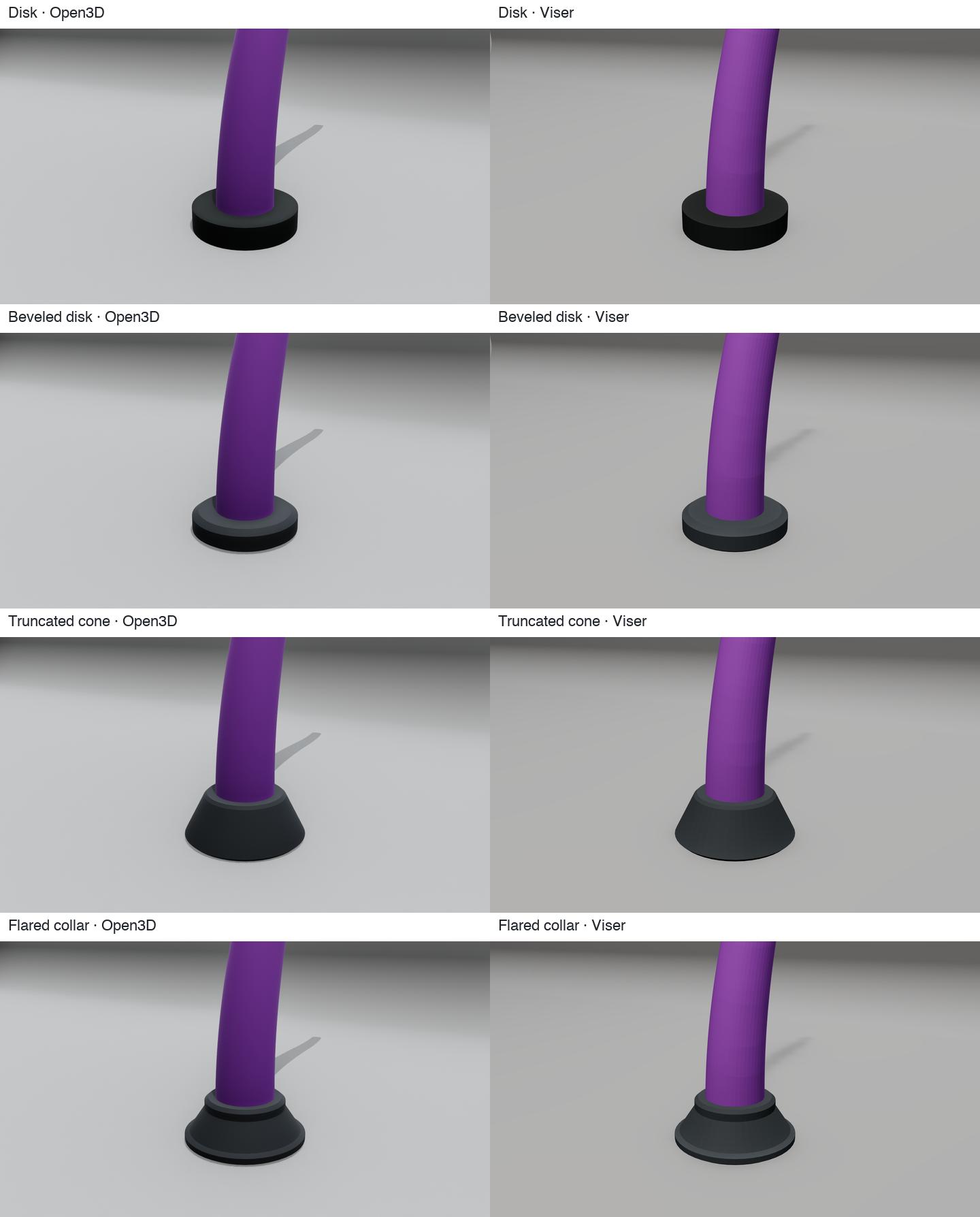
The disk and beveled disk above use a 28 mm radius and 12 mm height; the cone and collar use a 32 mm radius and 24 mm height. Each style can use either size.
Ground plane and backdrop
The independent config.scene.ground describes the floor:
from soromox.rendering import GroundPlaneConfig

config.scene.ground = GroundPlaneConfig(
    visible=True, surface=True, alignment="world", height=0.0,
    height_reference="world", size=1.2,
    color=(0.85, 0.85, 0.85), opacity=1.0,
    grid=True, grid_spacing=0.1, grid_major_every=5, receive_shadow=True,
)
The technical default uses surface=False: a grid without a filled slab.
surface=True adds a shadow-receiving plane. Grid spacing is fixed in metres,
anchored to the world origin and shared between backends. Automatic spacing
selects a ½/5 decimal step; grid_major_every and grid_major_color control
the major lines. Planar renderers show this reference as a line.
A world floor uses +Z for spatial robots and +Y for planar robots. normal
selects an explicit world normal; height is measured along the selected
reference in metres. The default height_reference="world" keeps the current
world-origin height behavior. height_reference="base_mounting_face" uses the
configured base plate thickness and the current robot base position, so
height=0 places a world-aligned floor at the mounting face of the base plate. A
world-aligned base-referenced floor requires all robot bases to share one
height; alignment="base" creates one plane per robot when they do not. Base
alignment already anchors each plane at its corresponding base mounting face, and
height offsets that plane along the base normal.
The base_mounting_face reference requires a fixed base; selecting it for a
floating-base robot raises ValueError. It also requires every fixed base axis
to be parallel or antiparallel to the floor normal: +Z shifts the floor down by
the plate thickness, while -Z shifts it up by the same amount.
The existing normal field represents the ground direction, so spatial z-up
and z-down planes are selected with normal=(0, 0, 1) and normal=(0, 0, -1).
For a hanging composition, rotate the camera position and look-at with the
mounting orientation and keep camera up at +z. The gallery provides this as
--mounting hanging, preserving the curved studio surface above the robot.
Automatic sizing fits the whole robot trajectory and helper bounds. Scenery is excluded from camera fitting. Live visualization retains its initial bounds. A curved backdrop uses the same resolved floor height.
BackdropConfig.radius controls the bend's horizontal reach;
vertical_radius controls its height and defaults to the same value.
curvature_easing ranges from 0 (an elliptical arc) to 1 (a curve that gradually
flattens into the floor and wall). wall_offset places the start of the bend
behind the scene center. These dimensions are multiples of the fitted scene extent.
The studio and clay presets use a low, gradually curved transition:
scene = SceneConfig.studio()
scene.backdrop.radius = 0.40
scene.backdrop.vertical_radius = 0.23
scene.backdrop.wall_offset = 0.02
scene.backdrop.curvature_easing = 0.80
Its key light illuminates both the floor and wall, with ambient illumination and point fills reducing the contrast across the bend. Bright and dark retain their distinct lighting settings. Clay uses neutral studio lighting with an additional cool rim light and a uniform matte robot material.
Camera configuration
The CameraConfig class provides unified camera configuration across renderers (Matplotlib, Open3D, Viser).
from soromox.rendering import CameraConfig

camera = CameraConfig(
    fov=60.0,                           # Field of view in degrees
    position=(0.6, -0.6, 0.4),          # Camera position (x, y, z)
    look_at=(0.0, 0.0, 0.1),            # Point camera looks at
    up=(0.0, 0.0, 1.0),                 # Camera up vector (default: Z-up)
    distance_factor=2.0,                # Multiplier for auto-positioning
)

renderer.show(q, camera_config=camera)
Camera parameters
| Parameter | Type | Default | Description |
|---|---|---|---|
fov |
float | 75.0 | Field of view in degrees |
exposure_ev100 |
float | 15.0 | Exposure value at ISO 100, approximated through illumination gain |
position |
tuple | None | Explicit camera position (x, y, z), None for auto |
look_at |
tuple | None | Point camera looks at, None for scene center |
up |
tuple | (0, 0, 1) | Camera up vector |
distance_factor |
float | 1.5 | Multiplier for auto-positioning distance |
position_offset |
tuple | (0.8, -0.8, 0.5) | Direction vector for camera placement |
Matplotlib applies fov and the viewing direction from position to
look_at; its axes limits determine the remaining framing. Open3D and Viser
also use the explicit camera distance.
Exposure and tone mapping
CameraConfig.exposure_ev100 defaults to 15. Increasing it by one halves light
strength in the modern Open3D adapter and the Viser approximation. This scales
illumination because their public APIs do not expose a shared photographic camera
exposure control. It does not simulate aperture, shutter blur or depth of field.
Choose scene.tone_mapping="backend-default", "linear" or "aces".
The patched Open3D build uses Filament’s Filmic mapper for backend-default,
preserving neutral highlights, and supports explicit linear and ACES selection.
The technical preset selects linear mapping to retain a white background; studio
presets use the default Filmic mapping. Older builds warn when this support is unavailable. The flat unlit path bypasses
post-processing. Viser uses its browser tone mapper.
Color configuration
Color Hierarchy
Colors are configured via RendererColorConfig + BackboneColorConfig and resolved using a consistent hierarchy. More specific inputs override less specific ones:
robot_palette → segment_palette → point_palette
robot_colors → segment_colors → point_colors
robot_segment_colors → robot_point_colors
Alpha values in per-robot colors propagate to more specific colors when those omit alpha.
RendererColorConfig
Main color configuration container for all renderers.
from soromox.rendering import ActuatorStyleConfig, BackboneColorConfig, RendererColorConfig

color_config = RendererColorConfig(
    backbone=BackboneColorConfig(
        robot_palette="viridis",
        segment_palette="soromox:ember",
    ),
    base_plate_color=(0.5, 0.5, 0.5),
    actuators=ActuatorStyleConfig(
        default_color=(0.8, 0.2, 0.2),
        kind_colors={"tendon": (0.85, 0.2, 0.15)},
        kind_radii={"tendon": 5e-4},
    ),
)

renderer.show(q, color_config=color_config)
BackboneColorConfig
Backbone-specific color configuration with palette and explicit color support.
from soromox.rendering import BackboneColorConfig

backbone_config = BackboneColorConfig(
    robot_palette="plasma",                    # Colormap for multiple robots
    segment_palette="soromox:ember",           # Per-segment colors
    robot_colors=[(0.2, 0.6, 0.9, 0.5)],       # Explicit robot colors with alpha
)
Built-in palettes and themes
Available palettes
SoRoMoX includes publication-friendly color palettes:
| Palette | Description |
|---|---|
soromox:okabe-ito |
Colorblind-friendly palette |
soromox:tol-bright |
Paul Tol's bright qualitative palette |
soromox:tol-muted |
Paul Tol's muted qualitative palette |
soromox:ember |
Warm gradient (orange to red) |
soromox:glacier |
Cool gradient (blue to cyan) |
soromox:slate |
Neutral gray gradient |
You can also use any Matplotlib colormap name (e.g., "viridis", "plasma", "coolwarm").
Color themes
Pre-configured themes for consistent styling:
from soromox.rendering import get_color_theme, list_builtin_themes

# List available themes
print(list_builtin_themes())

# Use a theme
theme = get_color_theme("soromox:paper")
renderer = ViserRenderer(robot, config=RendererConfig(colors=theme))
Color shape reference
When providing explicit colors, use these shapes:
| Parameter | Shape | Description |
|---|---|---|
robot_colors |
(N, ¾) | Per-robot colors (RGB or RGBA) |
segment_colors |
(S, ¾) | Per-segment colors |
point_colors |
(P, ¾) | Per-backbone-point colors |
robot_segment_colors |
(N, S, ¾) | Per-robot, per-segment colors |
robot_point_colors |
(N, P, ¾) | Per-robot, per-point colors |
Color legend
For creating legends in plots:
legend = renderer.get_color_legend(num_robots=3, color_config=color_config)
# Returns ColorLegend with robot labels and colors
Geometry and multi-robot layouts
config.geometry sets backbone and cross-section sample counts, swept or discrete
geometry, base plate dimensions, line widths and automatic robot spacing. Base
poses and runtime configurations determine the robot geometry; scene settings
only control its display. Increase sample counts for smoother exported surfaces.
Matplotlib, Open3D, and Viser accept batched robot configurations:
qwith shape(N, DOF)forshow()andrender_frame();q_tswith shape(N, T, DOF)for sequence rendering or animation.
Use base_offsets to place each robot explicitly or config.geometry.grid_spacing to control
automatically generated layouts. Viser additionally supports
multi_robot_layout="overlay" to render robots at a common base pose. Per-robot
colors and alpha values can distinguish overlaid configurations.
Open3D automatically merges each robot's backbone primitives into one dynamic
mesh when an interactive scene contains multiple robots. This removes most backend
geometry registrations; set merge_backbone_meshes=True to force merging for
one robot or False to disable it for profiling or compatibility. Viser uses
instanced or color-grouped meshes for animation and PBR meshes for static output.
Automatically sized ground planes use the complete trajectory and helper bounds.
renderer.render_sequence(
    ts,
    q_ts_batched,
    multi_robot_layout="overlay",
    color_config=color_config,
)
Output and recording
RenderOutputConfig selects image dimensions and default video encoding:
from soromox.rendering import RenderOutputConfig, VideoEncodingConfig

config.output = RenderOutputConfig(
    width=1920, height=1080,
    video=VideoEncodingConfig(codec="libx264", crf=18, pix_fmt="yuv420p"),
)
Set this before constructing the renderer. A per-call video_config replaces
config.output.video for that operation. Supply record_path to
render_sequence() to export a video or, where supported, an image sequence.
Open3D export is synchronous; a sequence without a recording path opens animated
playback. See the renderer API for backend-specific operations.
Backend support
Unsupported requested features produce one warning per renderer and mode.
| Backend/mode | Supported appearance | Approximation or omission |
|---|---|---|
Modern Open3D: image, video, static show() |
PBR material, explicit lights, floor/backdrop, shadows, AO | Exposure through light scaling; older builds may ignore tone-map selection; ambient tint, toon, face-normal and wireframe settings approximated |
| Legacy Open3D animation | Efficient geometry updates, colors, floor/backdrop, basic lit/unlit shading | PBR lighting, opacity, shadows, AO and exposure differ from modern output |
| Viser static | PBR GLB meshes, unlit materials, explicit lights, floor/backdrop, cast shadows | Lux/candela calibrated to browser intensity; fixed browser tone mapping can shift unlit colors; no AO or custom dielectric reflectance |
| Viser playback/live | Efficient mesh updates, colors, lights, floor/backdrop, shadows | Roughness/metallicity and unlit materials approximated by the editable mesh shader |
| Matplotlib | Robot colors, line geometry, viewing direction, white background and standard axes | Scene appearance, ground planes, backdrops, materials, lighting, shadows, AO and exposure ignored |
| OpenCV planar/HSA | BGR output, sRGB robot colors, line geometry and white background | Scene appearance, ground planes, backdrops, materials, lighting, shadows, AO and camera settings ignored |
On the tested patched Open3D 0.20 macOS build, opening a legacy OpenGL preview after a modern Metal GUI window can crash upstream GLFW. SoRoMoX rejects that transition with a clear error; launch the animated preview in a fresh Python process. Modern image and video exports and static windows are available independently.
Physical light units do not imply identical images: environment illumination, material models, tone mapping and shadow algorithms differ. Filament supports one dominant directional light; additional directional lights produce a warning. Presets use one directional key plus point lights for fill and rim illumination; they do not reproduce area-light reflections, subsurface scattering or reference-image compositing.
See the preset comparison gallery for actual tentacle renders, references and backend differences.
Configuration API
All public settings are available from soromox.rendering.config and re-exported
from soromox.rendering. Their implementation is organized by responsibility:
| Module | Contents |
|---|---|
config.scene |
Scene presets, lights, materials, ground planes and backdrops |
config.camera |
Camera position, orientation and exposure |
config.colors |
Robot/actuator colors, palettes and color resolution |
config.output |
Image dimensions and video encoding settings |
config.renderer |
Composed renderer settings, geometry sampling and validation |
base.py implements shared rendering behavior. Backend scene handles and
recording state stay with their renderers; video_encoding.py implements the
FFmpeg writer.
Public configuration types shared by all rendering backends.
dataclass

CameraConfig(exposure_ev100: float = 15.0, fov: float = 75.0, position: tuple[float, float, float] | None = None, look_at: tuple[float, float, float] | None = None, up: tuple[float, float, float] = (0.0, 0.0, 1.0), distance_factor: float = 1.5, position_offset: tuple[float, float, float] = (0.8, -0.8, 0.5))
Configuration for camera positioning and view parameters.
This config provides unified camera settings that work across different rendering backends. Settings are interpreted appropriately by each backend.
The camera can be positioned either: 1. Automatically based on scene content (position=None, look_at=None) 2. Explicitly by providing position and look_at coordinates
For automatic positioning, the camera is placed to view the entire scene using the distance_factor and position_offset parameters. Renderers can provide the robot base transform so automatic offsets are interpreted in the base frame instead of fixed world axes.
Attributes:
| Name | Type | Description |
|---|---|---|
exposure_ev100 |
float
|
Exposure value at ISO 100; larger values darken lit scenes. |
fov |
float
|
Field of view in degrees (used by 3D renderers) |
position |
tuple[float, float, float] | None
|
Explicit camera position as (x, y, z) or None for auto |
look_at |
tuple[float, float, float] | None
|
Point the camera looks at as (x, y, z) or None for auto (scene center) |
up |
tuple[float, float, float]
|
Camera up vector as (x, y, z), default is world Z-up convention |
distance_factor |
float
|
Multiplier for scene extent to compute camera distance (only used when position is None) |
position_offset |
tuple[float, float, float]
|
Direction vector for camera placement relative to center, as (x_factor, y_factor, z_factor) multiplied by computed distance. This is interpreted in the base frame when renderers provide one (only used when position is None) |
Example
compute_auto_position(center: ndarray, max_extent: float, reference_transform: ndarray | None = None) -> tuple[ndarray, ndarray]
Compute camera position and look_at from scene bounds.
This method computes automatic camera placement based on the scene's center and extent, using the distance_factor and position_offset.
Parameters:
| Name | Type | Description | Default |
|---|---|---|---|
center
|
ndarray
|
Scene center point as (3,) array |
required |
max_extent
|
float
|
Maximum extent (size) of the scene |
required |
reference_transform
|
ndarray | None
|
Optional base transform. When supplied,
automatic offsets are rotated by the base orientation. Shape
may be planar homogeneous |
None
|
Returns:
| Type | Description |
|---|---|
tuple[ndarray, ndarray]
|
Tuple of (camera_position, look_at_point) as numpy arrays |
Compute the camera up vector.
Returns:
| Type | Description |
|---|---|
ndarray
|
Up vector as a NumPy array with shape |
dataclass

ActuatorStyleConfig(default_color: tuple[float, float, float] = (0.9, 0.15, 0.15), default_radius: float | None = None, scalar_colormap: str = 'viridis', kind_colors: Mapping[str, tuple[float, float, float]] = dict(), kind_radii: Mapping[str, float] = dict())
Default style configuration for rendered actuator visual layers.
dataclass

BackboneColorConfig(segment_palette: ColorSpec = DEFAULT_SEGMENT_PALETTE, robot_palette: ColorSpec = DEFAULT_ROBOT_PALETTE, point_palette: ColorSpec | None = None, robot_colors: ColorSpec | None = None, segment_colors: ColorSpec | None = None, robot_segment_colors: ColorSpec | None = None, point_colors: ColorSpec | None = None, robot_point_colors: ColorSpec | None = None)
Color configuration for the robot backbone.
Hierarchy (low -> high specificity): robot_palette -> segment_palette -> point_palette robot_colors -> segment_colors -> point_colors robot_segment_colors -> robot_point_colors
More specific inputs override less specific ones.
dataclass

RendererColorConfig(robot_override: tuple[float, float, float] | None = None, backbone: BackboneColorConfig = BackboneColorConfig(), base_plate_color: tuple[float, float, float] = (0.2, 0.2, 0.2), actuators: ActuatorStyleConfig = ActuatorStyleConfig())
Shared sRGB robot colors.
Attributes:
| Name | Type | Description |
|---|---|---|
robot_override |
tuple[float, float, float] | None
|
Optional monochrome robot color overriding backbone and actuator palettes, including scalar colors. Helper objects are excluded. |
backbone |
BackboneColorConfig
|
Robot, segment and point palette hierarchy. |
base_plate_color |
tuple[float, float, float]
|
Base plate sRGB color. |
actuators |
ActuatorStyleConfig
|
Actuator colors, scalar maps and display radii. |
dataclass

RenderOutputConfig(width: int = 800, height: int = 600, video: VideoEncodingConfig = VideoEncodingConfig())
Image dimensions and video encoding defaults.
Attributes:
| Name | Type | Description |
|---|---|---|
width |
int
|
Positive image width in pixels. |
height |
int
|
Positive image height in pixels. |
video |
VideoEncodingConfig
|
Default video encoding configuration. |
Validate integer image dimensions.
Returns:
| Type | Description |
|---|---|
None
|
None. |
Raises:
| Type | Description |
|---|---|
ValueError
|
A dimension is not a positive integer. |
dataclass

VideoEncodingConfig(codec: str = 'libx264', pix_fmt: str = 'yuv444p', preset: str | None = 'veryslow', crf: int | None = 12, tune: str | None = 'animation', profile: str | None = None, bitrate: str | None = None, gop: int | None = None, extra_args: tuple[str, ...] = ())
Configuration for FFmpeg video encoding.
Attributes:
| Name | Type | Description |
|---|---|---|
codec |
str
|
Video codec (e.g., "libx264", "libx265") |
pix_fmt |
str
|
Output pixel format (e.g., "yuv444p", "yuv420p") |
preset |
str | None
|
Encoding preset (e.g., "veryslow", "slow", "medium", "fast") |
crf |
int | None
|
Constant Rate Factor (0-51, lower = higher quality) |
tune |
str | None
|
Tuning preset (e.g., "animation", "film", "grain") |
profile |
str | None
|
Codec profile (e.g., "high", "baseline") |
bitrate |
str | None
|
Target bitrate (e.g., "5M", "1000k") |
gop |
int | None
|
Group of Pictures size (keyframe interval) |
extra_args |
tuple[str, ...]
|
Additional FFmpeg arguments as tuple of strings |
dataclass

GeometryConfig(num_points: int = 80, cross_section_resolution: int = 48, backbone_style: Literal['swept', 'discrete'] = 'swept', base_plate_style: Literal['disk', 'beveled_disk', 'truncated_cone', 'flared_collar'] = 'flared_collar', base_plate_radius_scale: float = 2.0, base_plate_thickness: float = 0.06, line_width: float | None = 4.0, actuator_line_width: float = 2.0, grid_spacing: tuple[float, float] = (0.5, 0.5))
Shared geometry sampling and display dimensions.
Attributes:
| Name | Type | Description |
|---|---|---|
num_points |
int
|
Backbone samples, at least two. |
cross_section_resolution |
int
|
Contour samples, at least three. |
backbone_style |
Literal['swept', 'discrete']
|
Swept surface or discrete cross-section markers. |
base_plate_style |
Literal['disk', 'beveled_disk', 'truncated_cone', 'flared_collar']
|
Circular mounting shape for Open3D and Viser. The default flared collar has a flange, tapered body and upper rim. |
base_plate_radius_scale |
float
|
Base plate radius relative to cross-section size. |
base_plate_thickness |
float
|
Plate thickness in metres. |
line_width |
float | None
|
Backbone width in pixels for line-based renderers; None selects a cross-section-derived width where supported. |
actuator_line_width |
float
|
Actuator line width in pixels. |
grid_spacing |
tuple[float, float]
|
Multi-robot layout spacing in metres. |
Validate sample counts, dimensions and backbone style.
Returns:
| Type | Description |
|---|---|
None
|
None. |
Raises:
| Type | Description |
|---|---|
ValueError
|
A count, dimension or style is invalid. |
dataclass

RendererConfig(scene: SceneConfig = technical(), camera: CameraConfig = CameraConfig(), colors: RendererColorConfig = RendererColorConfig(), geometry: GeometryConfig = GeometryConfig(), output: RenderOutputConfig = RenderOutputConfig())
Composed configuration accepted by every renderer.
Attributes:
| Name | Type | Description |
|---|---|---|
scene |
SceneConfig
|
Scene appearance, lighting and ground plane. |
camera |
CameraConfig
|
Default camera and exposure. |
colors |
RendererColorConfig
|
Robot colors; helper colors are supplied to rendering operations. |
geometry |
GeometryConfig
|
Sampling, mesh style and display dimensions. |
output |
RenderOutputConfig
|
Image dimensions and video encoding. |
classmethod

clay(color: RGB = (0.72, 0.65, 0.56), *, scene_extent: float = 1.2, **overrides: Any) -> RendererConfig
Create a studio with uniform matte clay robot surfaces.
Parameters:
| Name | Type | Description | Default |
|---|---|---|---|
color
|
RGB
|
Warm-grey sRGB clay color; helper object colors are unaffected. |
(0.72, 0.65, 0.56)
|
scene_extent
|
float
|
Reference scene extent in metres for preset lighting. |
1.2
|
**overrides
|
Any
|
Complete configuration sections replacing preset defaults. |
{}
|
Returns:
| Type | Description |
|---|---|
RendererConfig
|
Editable renderer configuration with monochrome robot colors. |
Raises:
| Type | Description |
|---|---|
ValueError
|
Color or scene extent is invalid. |
dataclass

Approximate environment illumination.
Attributes:
| Name | Type | Description |
|---|---|---|
strength |
float
|
Nonnegative relative strength; one is the reference environment. |
color |
RGB
|
sRGB illumination tint in [0, 1]. Viser approximates environment lighting with a world-up hemisphere; Open3D uses its environment map. |
Validate intensity and tint.
Returns:
| Type | Description |
|---|---|
None
|
None. |
Raises:
| Type | Description |
|---|---|
ValueError
|
Strength or color is invalid. |
dataclass

BackdropConfig(enabled: bool = False, width: float = 5.0, depth: float = 2.5, height: float = 2.5, radius: float = 0.5, wall_offset: float = 0.42, vertical_radius: float | None = None, curvature_easing: float = 0.0)
Curved floor/wall dimensions relative to the fitted scene extent.
Attributes:
| Name | Type | Description |
|---|---|---|
enabled |
bool
|
Replace the ground plane with a curved backdrop. |
width |
float
|
Width as a multiple of scene extent. |
depth |
float
|
Forward floor reach as a multiple of scene extent. |
height |
float
|
Wall height as a multiple of scene extent. |
radius |
float
|
Horizontal bend reach as a multiple of scene extent. With vertical_radius=None and curvature_easing=0, this is a circular radius. |
vertical_radius |
float | None
|
Bend height in scene extents; None uses radius. |
curvature_easing |
float
|
Gradual change of tangent angle near the floor/wall joins, in [0, 1]. Zero gives an elliptical arc; one gives zero curvature at both joins. Intermediate values blend these profiles. |
wall_offset |
float
|
Distance behind scene center before the bend, in scene extents. |
Validate positive backdrop dimensions.
Returns:
| Type | Description |
|---|---|
None
|
None. |
Raises:
| Type | Description |
|---|---|
ValueError
|
A dimension is nonfinite or nonpositive. |
dataclass

DirectionalLightConfig(direction: Vector3 = (-0.25, 0.15, -1.0), illuminance_lux: float = 60000.0, color: RGB = (1.0, 0.97, 0.94), cast_shadow: bool = True, reference: Literal['world', 'ground'] = 'world')
Distant light with constant illuminance.
Attributes:
| Name | Type | Description |
|---|---|---|
direction |
Vector3
|
Direction in which light travels; normalized by adapters. |
reference |
Literal['world', 'ground']
|
World coordinates, or the ground basis used by the backdrop. |
illuminance_lux |
float
|
Nonnegative illuminance in lux. |
color |
RGB
|
sRGB illumination tint. |
cast_shadow |
bool
|
Whether this light casts shadows when scene shadows are enabled. |
Validate photometric intensity, color and direction.
Returns:
| Type | Description |
|---|---|
None
|
None. |
Raises:
| Type | Description |
|---|---|
ValueError
|
A light field is invalid. |
dataclass

GroundPlaneConfig(visible: bool = True, surface: bool = True, alignment: Literal['world', 'base'] = 'world', height: float = 0.0, height_reference: Literal['world', 'base_mounting_face'] = 'world', normal: Vector3 | None = None, size: float | None = None, color: RGB = (0.94, 0.95, 0.96), opacity: float = 1.0, grid: bool = True, grid_spacing: float | None = None, grid_color: RGB = (0.86, 0.86, 0.86), grid_major_every: int = 5, grid_major_color: RGB = (0.72, 0.72, 0.72), receive_shadow: bool = True)
World floor or per-robot base reference plane.
Attributes:
| Name | Type | Description |
|---|---|---|
visible |
bool
|
Display the ground reference, including its surface and grid. |
surface |
bool
|
Draw a filled surface; False displays only the optional grid. |
alignment |
Literal['world', 'base']
|
World alignment or alignment with each robot's base tangent. |
height |
float
|
Signed displacement along the selected height reference, in metres. |
height_reference |
Literal['world', 'base_mounting_face']
|
Use the world origin or the robot base plate mounting face as the height reference for world-aligned floors. |
normal |
Vector3 | None
|
Explicit world normal; None selects the robot's world-up direction. |
size |
float | None
|
Side length in metres; None fits the complete scene. |
color |
RGB
|
Surface sRGB color. |
opacity |
float
|
Surface opacity in [0, 1]. |
grid |
bool
|
Display a grid on the floor. |
grid_spacing |
float | None
|
Grid spacing in metres; None selects a nearby ½/5 step. |
grid_major_every |
int
|
Number of minor intervals between major grid lines. |
grid_major_color |
RGB
|
Major grid line sRGB color. |
grid_color |
RGB
|
Grid sRGB color. |
receive_shadow |
bool
|
Receive cast shadows where supported. |
Validate alignment, dimensions and surface colors.
Returns:
| Type | Description |
|---|---|
None
|
None. |
Raises:
| Type | Description |
|---|---|
ValueError
|
A ground field is invalid. |
dataclass

MaterialConfig(shading: Literal['standard', 'unlit', 'toon3', 'toon5'] = 'standard', roughness: float = 0.72, metallic: float = 0.0, reflectance: float = 0.35, opacity: float = 1.0, flat_shading: bool = False, wireframe: bool = False)
Default surface response for robot geometry.
Attributes:
| Name | Type | Description |
|---|---|---|
shading |
Literal['standard', 'unlit', 'toon3', 'toon5']
|
Lit standard/toon shading or unlit color rendering. |
roughness |
float
|
Roughness in [0, 1]. |
metallic |
float
|
Metallic fraction in [0, 1]. |
reflectance |
float
|
Dielectric reflectance in [0, 1]. |
opacity |
float
|
Multiplier for per-object alpha in [0, 1]. |
flat_shading |
bool
|
Use face normals rather than smooth vertex normals. |
wireframe |
bool
|
Draw mesh edges instead of filled triangles when supported. |
Validate the shading mode and normalized material parameters.
Returns:
| Type | Description |
|---|---|
None
|
None. |
Raises:
| Type | Description |
|---|---|
ValueError
|
Shading or a material parameter is invalid. |
dataclass

PointLightConfig(position: Vector3 = (-0.3, -0.4, 1.1), intensity_candela: float = 2785.21, color: RGB = (1.0, 0.98, 0.96), range_m: float = 4.0, cast_shadow: bool = False, reference: Literal['world', 'ground'] = 'world')
Isotropic point light with inverse-square attenuation.
Attributes:
| Name | Type | Description |
|---|---|---|
position |
Vector3
|
Position in metres. |
reference |
Literal['world', 'ground']
|
World coordinates, or the ground basis used by the backdrop. |
intensity_candela |
float
|
Nonnegative luminous intensity in candela. |
color |
RGB
|
sRGB illumination tint. |
range_m |
float
|
Positive finite influence distance in metres. |
cast_shadow |
bool
|
Whether this light casts shadows. |
classmethod

from_lumens(lumens: float, **kwargs: Any) -> PointLightConfig
Construct an isotropic light from its total luminous flux.
Parameters:
| Name | Type | Description | Default |
|---|---|---|---|
lumens
|
float
|
Total flux in lumens, distributed over 4 pi steradians. |
required |
**kwargs
|
Any
|
Remaining point-light fields. |
{}
|
Returns:
| Type | Description |
|---|---|
PointLightConfig
|
Point light with intensity equal to |
Raises:
| Type | Description |
|---|---|
ValueError
|
Flux or another field is invalid. |
Validate photometric intensity, position, color and range.
Returns:
| Type | Description |
|---|---|
None
|
None. |
Raises:
| Type | Description |
|---|---|
ValueError
|
A light field is invalid. |
dataclass

SceneConfig(background: RGB = (1.0, 1.0, 1.0), ground: GroundPlaneConfig = (lambda: GroundPlaneConfig(surface=False))(), backdrop: BackdropConfig = BackdropConfig(), ambient: AmbientLightConfig = (lambda: AmbientLightConfig(strength=0.8))(), lights: tuple[DirectionalLightConfig | PointLightConfig, ...] = (lambda: (DirectionalLightConfig(reference='ground', illuminance_lux=80000, color=(1.0, 1.0, 1.0)), from_lumens(250000, reference='ground', position=(0.0, -0.8, 0.8), range_m=6.0)))(), material: MaterialConfig = MaterialConfig(), shadows: bool = False, ambient_occlusion: bool = False, tone_mapping: Literal['backend-default', 'linear', 'aces'] = 'backend-default', backbone_cast_shadow: bool = True, sphere_cast_shadow: bool = True)
Shared scene appearance; unsupported features produce backend warnings.
Attributes:
| Name | Type | Description |
|---|---|---|
background |
RGB
|
sRGB background color. |
ground |
GroundPlaneConfig
|
Ground surface and reference grid. |
backdrop |
BackdropConfig
|
Curved studio scenery. |
ambient |
AmbientLightConfig
|
Relative environment illumination. |
lights |
tuple[DirectionalLightConfig | PointLightConfig, ...]
|
Directional and point lights in physical units. |
material |
MaterialConfig
|
Default robot surface material. |
shadows |
bool
|
Enable cast shadows globally. |
ambient_occlusion |
bool
|
Enable local occlusion shading. |
tone_mapping |
Literal['backend-default', 'linear', 'aces']
|
Backend default, linear, or ACES output transformation. |
backbone_cast_shadow |
bool
|
Backbone shadow casting. |
sphere_cast_shadow |
bool
|
Helper sphere shadow casting. |
Validate the background and output transformation.
Returns:
| Type | Description |
|---|---|
None
|
None. |
Raises:
| Type | Description |
|---|---|
ValueError
|
The background, light type or tone mapping is invalid. |
classmethod

technical(*, scene_extent: float = 1.2, **overrides: Any) -> SceneConfig
Create a white technical view with a grid and balanced illumination.
Linear tone mapping preserves the white background in Open3D. Backends with fixed output transforms approximate the requested tone mapping.
Parameters:
| Name | Type | Description | Default |
|---|---|---|---|
scene_extent
|
float
|
Reference extent in metres; scales preset point lighting. |
1.2
|
**overrides
|
Any
|
Scene fields replacing the defaults. |
{}
|
Returns:
| Type | Description |
|---|---|
SceneConfig
|
Independent, editable scene configuration. |
Raises:
| Type | Description |
|---|---|
ValueError
|
Scene extent is not finite and positive. |
classmethod

flat(**overrides: Any) -> SceneConfig
Create an unlit white scene preserving assigned object colors.
Parameters:
| Name | Type | Description | Default |
|---|---|---|---|
**overrides
|
Any
|
Scene fields replacing the preset defaults. |
{}
|
Returns:
| Type | Description |
|---|---|
SceneConfig
|
Editable scene without floor, lighting, shadows or ambient occlusion. |
classmethod

studio(style: Literal['neutral', 'bright', 'dark'] = 'neutral', *, scene_extent: float = 1.2, **overrides: Any) -> SceneConfig
Create a studio scene with lights oriented in the ground basis.
Parameters:
| Name | Type | Description | Default |
|---|---|---|---|
style
|
Literal['neutral', 'bright', 'dark']
|
Neutral grey, bright white, or dark charcoal studio. The dark studio uses a frontal key to illuminate upright robot surfaces. |
'neutral'
|
scene_extent
|
float
|
Reference object arrangement extent in metres. Positions scale linearly and point intensities quadratically with this value. |
1.2
|
**overrides
|
Any
|
Scene fields replacing the preset defaults. |
{}
|
Returns:
| Type | Description |
|---|---|
SceneConfig
|
Editable scene with a curved backdrop and matte materials. |
Raises:
| Type | Description |
|---|---|
ValueError
|
Style or scene extent is invalid. |
Light orientation for hanging scenes
Preset directional and point lights use reference="ground", resolving their
vectors through the same basis as the backdrop. GroundPlaneConfig(normal=(0, 0, -1))
rotates that basis by 180 degrees about world Y. For tilted normals, backdrop
depth follows world +Y projected into the ground plane, avoiding a sign flip
when the normal crosses the XY plane. At normals parallel to world Y, depth
is undefined and the basis uses world +X for width; this reference-axis
singularity cannot provide a continuous orientation for every approach direction.
Custom lights default to
reference="world", preserving explicit world positions and directions. Ground-relative
point positions are measured from the world origin; ground height does not translate
them. Preset intensity and range retain the existing scene_extent scaling.
The gallery's --mounting hanging also rotates robot placement and camera position,
while retaining camera up at +z for an upside-down composition. Merely changing the
camera up vector rolls the image; it does not change the robot's world mounting or
the ground normal. Open3D's fixed environment map may produce ambient shading
differences between mounting orientations.